- Vikko Taruc
- Posts
- Missed Part 1? Here’s How to Take Your Task Management to the Next Level
Missed Part 1? Here’s How to Take Your Task Management to the Next Level
Take Control of Your Tasks with TaskMaster Pro and My Plug-and-Play Notion Template

Vikko
September 22, 2024
Hey mate!
This newsletter is part of a series where I share four essential systems to help you overcome chaos and overwhelm.
Last week, you’ve learned about the three core principles of TaskMaster Pro. (And if you haven’t read it yet, I highly recommend you to click here and read last week’s issue.)
Take Note, Organize, and Take Action.
Today, we’re going to bring those principles to life.
Think of this guide as your backstage pass.
You’re about to see how everything fits together—from taking note of ideas before they slip away to turning those ideas into actionable plans.
Let’s begin.
Step 1: Take Note – Using the Inbox View to Take Note of Tasks
Let me tell you a quick story.
Imagine yourself as a performer—you're on stage, and the lights are bright.
The audience is watching, waiting for your next move.
But instead of juggling balls or pins, you're juggling thoughts, tasks, and ideas.
One by one, they’re thrown at you.
“Don’t forget that email”
“Schedule that meeting”
“Start the new project”
You try to catch them all, but before you know it, they start to fall.
This is what happens when you don’t have a system to take note of ideas and tasks.
That’s where the Inbox View in Notion comes in.
It’s your net.
It’s the place where every thought, task, or reminder can land safely.
How it Works:
When you have a new idea or task, don’t hold it in your head—put it in the Inbox.
Just as the juggler knows they can’t hold onto every pin forever, you can’t remember everything.
In the Inbox View, every task waits patiently until you’re ready to process it.
There’s no pressure to organize right away.
The goal here is simple: take note of everything before it gets lost.

Screenshot 1: A screenshot of the Inbox View showing a few captured tasks.
So take a moment.
Spend 5 minutes capturing a few tasks or ideas into the Inbox using the Notion template.
You don’t have to organize them yet—just get them out of your head and into the system.
Trust me, you’ll feel lighter already.
Step 2: Organize – Sorting Tasks into Single Action Items or Projects
Remember that juggler?
After catching all those pins, what does he do next?
He pauses.
He doesn’t just throw everything back into the air.
He Organizes.
Some pins need to be tossed immediately—quick, single actions.
Others require more attention—longer projects that need time and planning.
In TaskMaster Pro, that’s what the second principle is all about: Organize.
Once you’ve captured everything in your Inbox, it’s time to categorize those tasks.
Are they Single Action Items—simple, quick tasks like “send an email”—or are they Projects that require multiple steps?
How it Works:
Tasks that are quick and can be done in one step are sorted into the Single Action List.
Larger, more involved tasks—like “create a presentation” or “prepare for quarterly report ”—become Projects.
The key is knowing which is which, just like our juggler knows which pin to toss next.
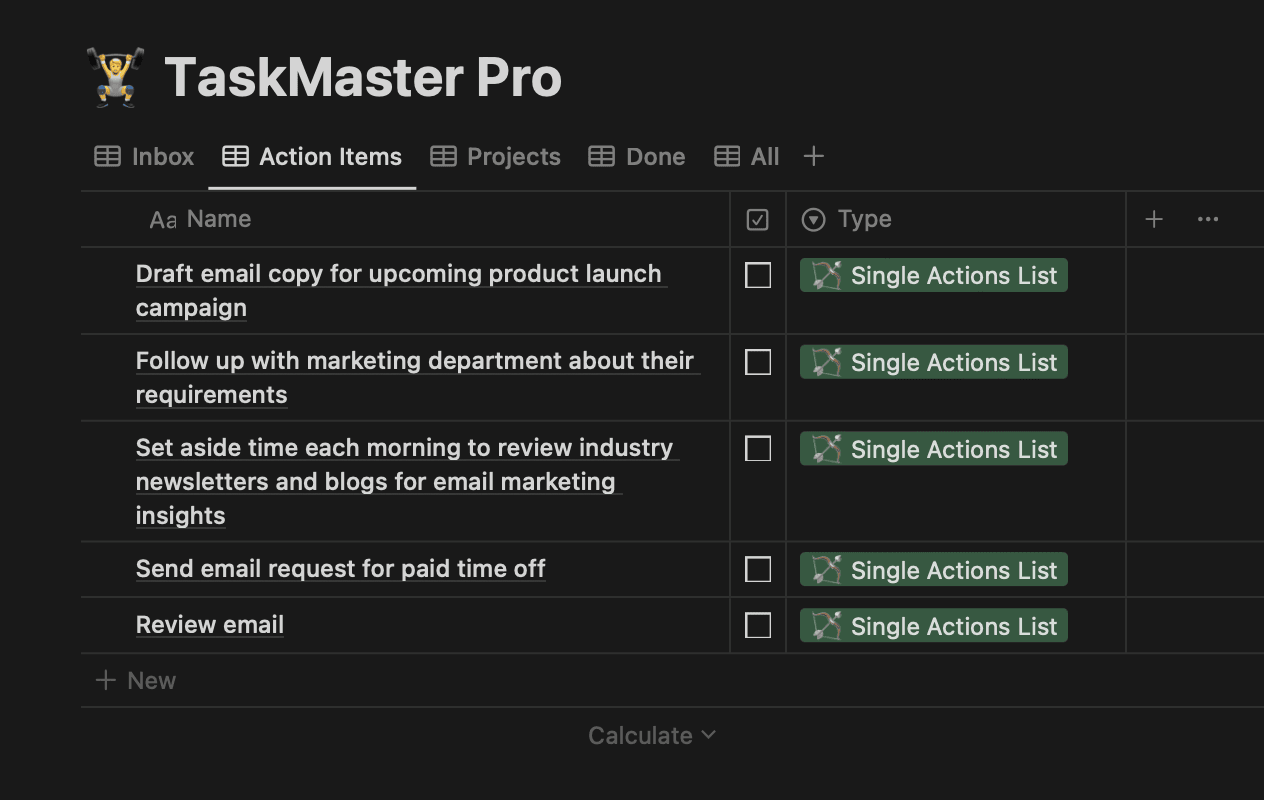
Screenshot 2: A screenshot of the Single Action List View showing simple, one-step tasks.

Screenshot 3: A screenshot of the Projects View

Screenshot 4: A screenshot of a Project, showing larger, multi-step tasks.
The beauty of this system is that it helps you break down chaos into clarity.
Your tasks are no longer spinning in the air—they’re neatly categorized, ready for action.
But here’s a key reminder: Capturing and organizing should be done at separate times.
Think of it like writing.
When you draft a story, you don’t edit as you go.
You capture the raw ideas first.
Then, later, you come back and organize or refine them.
The same is true for tasks.
Don’t stress about organizing while you’re capturing.
Just get those ideas down, and organize them when you’re ready.
Step 3: Take Action – How to Manage and Prioritize Tasks in Different Views
Now that you’ve taken note of your tasks and organized them into categories, it’s time for the final principle of TaskMaster Pro: Take Action.
Think back to our juggler.
He’s captured the pins, organized them into manageable groups, and now it’s time for the real performance.
This is where the magic happens—moving from planning to doing.
But let’s face it.
Taking action is more than just looking at your list.
You need a strategy.
Here’s how you can sharpen your approach:
Tip #1 Prioritization: Tackling What Matters Most
Not every task carries the same weight.
The key to effective action is learning how to prioritize.
Here’s a simple approach: rank your tasks by urgency and importance.
Ask yourself:
What needs to be done now? (Urgent and important)
What can be done later? (Important, but not urgent)
What should be delegated or even deleted? (Low importance)
By categorizing your tasks, you’ll know exactly where to focus your energy.
The best performers don’t juggle everything at once.
They focus on the most critical pins.
Tip #2 Time Blocking: Make Room for Focused Work
Once you’ve prioritized your tasks, it’s time to block out dedicated periods to work on them.
Time blocking is one of the most effective ways to stay on top of your workload.
Instead of trying to tackle everything at random, schedule blocks of time in your day to focus on specific tasks or projects.
For example, you might block 30 minutes in the morning to clear your Single Action List.
And then dedicate two hours to work on a critical Project.
This method allows you to focus on one thing at a time, without distractions.
Tip #3 Eat That Frog: Start with the Hardest Task
There’s a famous productivity principle called Eat That Frog, coined by Brian Tracy.
It’s simple but powerful: start your day with the task you dread the most.
This is often the most important task—the one that will make the biggest impact.
By tackling it first, you’ll free yourself from the mental burden of procrastination and set the tone for a productive day.
Think of it like this: if you “eat the frog” first thing in the morning, everything else will seem easier.
Whether it’s a major presentation or a challenging project, get it out of the way early, and you’ll find the rest of your tasks much more manageable.
How it Works:
You’re equipped with prioritization strategies and time management techniques.
Here’s how you can use the views in Notion to implement these principles:
Single Action List View: Tackle quick, one-step tasks during your time blocks. These are great for knocking out in short bursts of focused work.
Projects View: Use your time blocks to work on one project at a time. Break it down into smaller steps and focus on consistent progress.
Inbox View: When new tasks come up, take note of them here without worrying about where they belong yet. You’ll prioritize them later.
Done View: Celebrate your wins! Completing tasks here will give you the momentum to keep going.
Wrapping Up and Next Steps
You’ve laid the foundation with TaskMaster Pro by mastering Take Note, Organize, and Take Action.
But remember, just like the juggler’s act, this system gets smoother the more you practice.
The more you use it, the more natural it becomes.
Next week, we’ll dive into a system that helps you stay proactive, manage your time effectively, and focus on the bigger picture.
It’s the next step in ensuring your work aligns with long-term goals and keeps you ahead of the curve.
And don’t forget: take some time this week to experiment with the Notion template. Knowledge is best used while it’s still fresh!
By next week, you’ll be ready to integrate a system that takes your productivity to the next level.
P.S.
Don’t forget to duplicate the Notion template below and start experimenting with it. [Duplicate the TaskMaster Pro Notion Template here]
Feeling unproductive? Book a 1-on-1 productivity strategy call with me (free).
Goals not moving? Get a personalized weekly plan (free). I’ll help you make a weekly plan so help you achieve your goals faster.